Linux簡(jiǎn)明系統(tǒng)維護(hù)手冊(cè)(三)
2024-08-28 00:23:37
供稿:網(wǎng)友
(3)安裝dhcp服務(wù)器
1���、源程序下載地址是:ftp://ftp.isc.org/isc/dhcp/dhcp-3.0.tar.gz ����,我們的版本是:dhcpd-3.0
2�、復(fù)制到:/usr/local/scr后解壓:tar zxvf dhcp-3.0.tar.gz
3�����、cd /usr/local/src/dhcp-3.0.tar.gz
4、./configure
5���、make(如果不是第一次編譯�����,先make clean)
6�、make install
7�����、cp ./server/dhcpd.conf /etc
8�����、編輯這個(gè)文件,看起來(lái)類似下面這樣:(要更改的地方用粗體標(biāo)出)
# dhcpd.conf
#
# sample configuration file for isc dhcpd
#
# option definitions common to all supported networks...
option domain-name "rd.xxx.com";
option domain-name-servers compaq.rd.xxx.com;
default-lease-time 86400;
max-lease-time 172800;
ddns-update-style ad-hoc;
# if this dhcp server is the official dhcp server for the local
# network, the authoritative directive should be uncommented.
#authoritative;
# use this to send dhcp log messages to a different log file (you also
# have to hack syslog.conf to complete the redirection).
log-facility local7;
# no service will be given on this subnet, but declaring it helps the
# dhcp server to understand the network topology.
# this is a very basic subnet declaration.
subnet 21.9.22.0 netmask 255.255.255.224 {
range 21.9.22.2 21.9.22.6;
option routers 21.9.22.1;
}
# this declaration allows bootp clients to get dynamic addresses,
# which we don't really recommend.
#subnet 10.254.239.32 netmask 255.255.255.224 {
# range dynamic-bootp 10.254.239.40 10.254.239.60;
# option broadcast-address 10.254.239.31;
# option routers rtr-239-32-1.example.org;
#}
# a slightly different configuration for an internal subnet.
#subnet 10.5.5.0 netmask 255.255.255.224 {
# range 10.5.5.26 10.5.5.30;
# option domain-name-servers ns1.internal.example.org;
# option domain-name "internal.example.org";
# option routers 10.5.5.1;
# option broadcast-address 10.5.5.31;
# default-lease-time 600;
# max-lease-time 7200;
#}
# hosts which require special configuration options can be listed in
# host statements. if no address is specified, the address will be
# allocated dynamically (if possible), but the host-specific information
# will still come from the host declaration.
#host passacaglia {
# hardware ethernet 0:0:c0:5d:bd:95;
# filename "vmunix.passacaglia";
# server-name "toccata.fugue.com";
#}
# fixed ip addresses can also be specified for hosts. these addresses
# should not also be listed as being available for dynamic assignment.
# hosts for which fixed ip addresses have been specified can boot using
# bootp or dhcp. hosts for which no fixed address is specified can only
# be booted with dhcp, unless there is an address range on the subnet
# to which a bootp client is connected which has the dynamic-bootp flag
# set.
#host fantasia {
# hardware ethernet 08:00:07:26:c0:a5;
# fixed-address fantasia.fugue.com;
#}
# you can declare a class of clients and then do address allocation
# based on that. the example below shows a case where all clients
# in a certain class get addresses on the 10.17.224/24 subnet, and all
# other clients get addresses on the 10.0.29/24 subnet.
#class "foo" {
# match if substring (option vendor-class-identifier, 0, 4) = "sunw";
#}
#shared-network 224-29 {
# subnet 10.17.224.0 netmask 255.255.255.0 {
# option routers rtr-224.example.org;
# }
# subnet 10.0.29.0 netmask 255.255.255.0 {
# option routers rtr-29.example.org;
# }
# pool {
# allow members of "foo";
# range 10.17.224.10 10.17.224.250;
# }
# pool {
# deny members of "foo";
# range 10.0.29.10 10.0.29.230;
# }
上面這個(gè)文件中后面都是注釋,是原來(lái)系統(tǒng)給你的配置做的例子����,可以不要。當(dāng)然除非你用到它們���,并且清楚它們的含義��。
9、建立空文件:touch /var/state/dhcp/dhcpd.leases空文件
10�、檢查內(nèi)核編譯選項(xiàng):networking options-----packet socket: mmapped io和socket filtering選項(xiàng)是否被選中(不知道怎么看�����?看看前面的文章,用make menuconfig呀)����,如果沒(méi)有就需要重新編譯內(nèi)核了���。
11、route add -host 255.255.255.255 dev eth0
12、roote add -host localhost dev eth0
13��、在/etc/rc.d/rc.local最后增加一行route add -host 255.255.255.255 dev eth0
14、reboot系統(tǒng)
15�����、用dhcpd命令啟動(dòng)dhcp��,用其他的機(jī)器試試看能不能自動(dòng)配置網(wǎng)絡(luò)了。
(4) 安裝apache+mysql+php+gd+png+zlib+jpeg+freetype+sslmod
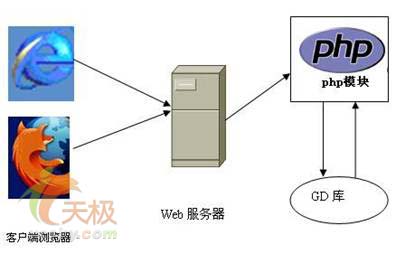
這么一大堆東西為什么要一塊說(shuō)呢��?因?yàn)樗麄冎虚g是有緊密聯(lián)系的,尤其是那個(gè)php���,用到其他所有的模塊。要想php功能全�,只能一步步來(lái)了。
1��、首先安裝mysql:從http://www.mysql.com/downloads/index.html下載自己覺(jué)得合適的版本����。這里用3.23.42版本��。
2�����、進(jìn)入目錄/usr/local/src(這個(gè)以后就不用說(shuō)了吧����?)解壓縮:tar zxvf mysql-3.23.42.tar.gz
3����、cd mysql-3.23.42/
4�、configure --prefix=/usr/local/mysql
5、make
6����、make install
7��、useradd mysql ; groupadd mysql ; su mysql ;(建立命名為mysql的用戶和組�����,并切換為mysql身份)
8����、scripts/mysql_install_db (建立數(shù)據(jù)庫(kù)結(jié)構(gòu))
9、cd /usr/local/mysql/bin
10�����、./safe_mysqld & (啟動(dòng)了)
11�、./mysqladmin -u root password "new-password"(你的新密碼����,記住mysql的密碼核系統(tǒng)密碼是獨(dú)立的�,缺省是沒(méi)有密碼)
12��、用mysql程序試試看�����。
下面的步驟都很程式化��,我盡量簡(jiǎn)潔地寫出����。
13�����、下載相關(guān)的軟件包:地址表格如下
軟件 版本 地址
jpegsrc.v6b.tar.gz 6b ftp://ftp.uu.net/graphics/jpeg
zlib.tar.gz 1.1.3 ftp://ftp.uu.net/graphics/png/src
freetype-2.0.8.tar.gz 2.0.8 http://www.freetype.org
libpng-1.0.10.tar.gz 1.0.10 ftp://ftp.uu.net/graphics/png/src
gd-1.8.4.tar.gz 1.8.4 http://www.boutell.com/gd
apache_1.3.23.tar.gz 1.3.23 http://www.apache.org
php-4.1.1.tar.gz 4.1.1 http://www.php.net
number4.tar.gz 4 http://www.php.net/extra
rsaref20.tar.z 2.0 ftp://ftp.ai.mit.edu/pub/deberg
openssl-engine-0.9.6c.tar.gz 0.9.6c http://www.openssl.org/source
mod_ssl-2.8.6-1.3.23.tar.gz 2.8.6 http://www.modssl.org
下齊了就放在/usr/local/src目錄下����,除了number4.tar.gz和rsaref20.tar.z以外,其他一律用tar zxvf xxxx.tar.gz解壓縮�。(過(guò)癮吧����?)
特殊的,rsaref20.tar.z 需要先建立一個(gè)rsaref-2.0目錄����,然后把rsaref20.tar.z復(fù)制到改目錄下用tar zxvf rsaref30.tar.z釋放壓縮����。number4.tar.gz需要復(fù)制到php-4.1.1目錄內(nèi)�����,然后用tar zxvf number4.tar.gz解壓縮�����。
下面的描述我想簡(jiǎn)單一點(diǎn),只寫出進(jìn)入目錄后執(zhí)行的命令��。那些目錄都是釋放的時(shí)候自己建立的�����,如果你這些操作都在/usr/local/src下面執(zhí)行,所有的目錄就都在這里面���。最好按照順序執(zhí)行。再羅嗦一句:如果不是第一次編譯�����,一般情況請(qǐng)執(zhí)行一次make clean后再編譯。
14����、[jpeg-6b]:生成jpeg圖像的函數(shù)庫(kù)。
./configure
make
make test
make install
15�、[zlib-1.1.3]:壓縮算法庫(kù)��,是png和jpeg需要的
make test
make install
16��、[freetype-2.0.8]:字體庫(kù)��,在圖像上使用字體的時(shí)候需要用到,
./configure --prefix=/usr/local
make
make install
17�、[libpng-1.0.10]:生成png圖像的函數(shù)庫(kù)
cp scripts/makefile.linux makefile
make test
pngtest pngnow.png
(如果都通過(guò)測(cè)試了,請(qǐng)繼續(xù)���。否則,看看錯(cuò)誤提示����,改正錯(cuò)誤)
make install
18�����、[gd-1.8.4]:gd庫(kù)���,用來(lái)動(dòng)態(tài)生成圖像用��,這里主要是配合php生成圖像��。
編輯makefile 文件:
把下列行取消注釋符號(hào)(#):
cflags=-o -dhave_libxpm -dhave_libpng -dhave_libjpeg
-dhave_libfreetype -dhave_libttf
libs=-lgd -lpng -lz -ljpeg -lfreetype -lm -lttf
注釋下列行(增加#):
cflags=-o -dhave_libpng -dhave_libjpeg
libs=-lgd -lpng -lz -lm
修改下列行:
includedirs=-i. -i/usr/local/include/freetype2 -i/usr/include/x11
-i/usr/x11r6/include/x11 -i/usr/local/include
-i/usr/include/freetype
保存后執(zhí)行:
make
make install
19、[apache_1.3.23]:步驟一 ./configure --prefix=/usr/local/apache
20�、[php-4.1.1]:
如果不是第一次安裝,請(qǐng)刪除:config.cache文件�,然后執(zhí)行先執(zhí)行make clean
接下來(lái)配置環(huán)境���,輸入一個(gè)比較長(zhǎng)的命令:
./configure
--with-apache=/usr/local/src/apache_1.3.23
--with-config-file-path=/local/apache/conf
--with-enable-versioning
--with-mysql=/usr/local/mysql
--with-ftp
--with-gd=/usr/local/src/gd-1.8.4
--with-enabled-bcmath=yes
--with-disable-debug
--enable-memory-limit=yes
--enable-track-vars
--with-zlib
--with-jpeg-dir=/usr/local/src/jpeg-6b
--with-png-dir=/usr/local/src/libpng-1.0.10
--with-freetype-dir=/usr//local/src/freetype-2.0.8
當(dāng)然你也可以實(shí)現(xiàn)準(zhǔn)備一個(gè)含有上述命令的sh文件,這樣改起來(lái)方便些�����。我就是這樣做的�����。
make
make install
21��、[rsaref-2.0]:rsa加密模塊
前面說(shuō)過(guò)�,這個(gè)目錄的釋放是特殊的���,先見(jiàn)目錄后釋放��,希望你是這樣做的����。
cp -rp install/unix local
cd local
make
mv rsaref.a librsaref.a
22���、[openssl-engine-0.9.6c]:openssl引擎
./config -prefix=/usr/local/ssl -l`pwd`/../rsaref-2.0/local/ rsaref –fpic
make
make test
make install
23���、[mod_ssl-2.8.6-1.3.23]
./configure --with-apache=../apache_1.3.23
24����、[apache_1.3.23]步驟二
./configure --prefix=/usr/local/apache --enable-shared=ssl
--enable-module=ssl --activate-module=src/modules/php4/libphp4.a
make
make certificate type=custom(回答一些問(wèn)題)
make install
25����、收尾工作:
編輯/usr/local/apache/conf/httpd.conf文件��,增加一行:
addtype application/x-httpd-php .php
26��、用命令/usr/local/apache/bin/apachectl configtest檢查一下配置文件的正確性。
27�����、用/usr/lcoal/apache/bin/apachectl start啟動(dòng)apache服務(wù)器
28�、在/usr/local/apache/htdocs建立一個(gè)test.php文件包含下列內(nèi)容:
phpinfo();
?>
29����、在別的機(jī)器上用瀏覽器看一下這個(gè)機(jī)器:http://xxx.xxx.xxx.xxx/test.php會(huì)出現(xiàn)php的配置總匯,看看前面編譯的模塊都在不在�。
30��、檢驗(yàn)ssl很麻煩,需要用apachectl startssl啟動(dòng)apache然后還要生成一大堆證書��。這里就不討論了����。
31�、把/usr/local/apache/bin/apachectl文件復(fù)制到/etc/rc.d/init.d中�����,然后在/etc/rc.d/rd3.d中建立個(gè)符號(hào)連接指向/etc/rc.d/init.d中的上述文件:
ln -s ../init.d/apachectl s70apachectl
這樣系統(tǒng)啟動(dòng)的時(shí)候就可以自動(dòng)啟動(dòng)apache和她的哪一大堆模塊了���。
呼~~~~(喘口氣)到這里,就基本上完成了一個(gè)功能很全的web服務(wù)器系統(tǒng)了�����。
(5)安裝 ftp 服務(wù)器
(6)安裝 pop3服務(wù)器
有的郵件服務(wù)器自己帶pop3功能(比如qmail����、xmail)���,如果你用這幾種郵件服務(wù)器軟件,當(dāng)然就不用安裝pop3了����。目前,常用的郵件服務(wù)器里面不帶pop3的好象只有sendmail和postfix等少數(shù)幾種。這幾種郵件服務(wù)器軟件使用的都是系統(tǒng)用戶�����,而我們安裝的pop3也只是對(duì)系統(tǒng)用戶的郵件進(jìn)行彈出操作的����。這里我們使用的版本和下載地址是:
qpopper4.0.3.tar.gz
http://www.eudora.com/qpopper_general/
同樣的�,把文件下載到/usr/local/src中��,按照下列步驟安裝:
tar zxvf qpopper4.0.3.tar.gz
cd qpopper4.0.3
./configure
make
make install
完成后����,qpopper安裝在/usr/local/sbin中(如果你愿意把它放在其他地方,可以在前面用./configure –prefix=/your_path指定)�,文件名叫作popper。通常情況下�����,popper是作為一個(gè)inetd(超級(jí)網(wǎng)絡(luò)服務(wù)進(jìn)程)的子進(jìn)程加載的�。這樣需要編輯文件/etc/inetd.conf并做下面改動(dòng): ...
# pop3 mail server
#pop-3 stream tcp nowait root /usr/sbin/tcpd ipop3d
pop-3 stream tcp nowait root /usr/local/sbin/popper qpopper –s
...
增加黑體的這一行,注釋掉原來(lái)的(上面這一行),注意��,如果你的安裝路經(jīng)不同�,記著改過(guò)來(lái)呀��。然后�,用下面的命令得到inetd的進(jìn)程號(hào):
ps –ax | grep inetd
得到結(jié)果類似:
248 ? s 0:00 inetd
什么��?哪個(gè)是進(jìn)程號(hào)����?就是最前面那個(gè)數(shù)字�����。然后用下面的命令重新啟動(dòng)inetd:
kill –hup 248
用下面的命令看看pop3是不是啟動(dòng)了���。
netstat -ln|grep 110
如果結(jié)果是這樣���,就恭喜了��。
tcp 0 0 0.0.0.0:110 0.0.0.0:* listen
這里還要補(bǔ)充一點(diǎn)�,少數(shù)情況下,pop3進(jìn)程需要獨(dú)立的監(jiān)聽端口��,也就是不作為inetd的子進(jìn)程裝載,上面過(guò)程需要做如下改動(dòng):
./configure的時(shí)候加上--enable-standalone參數(shù)���。
編輯/etc/inetd.conf不增加黑體一行�����,但需要注釋掉原來(lái)的pop-3一行(如果有的話)���。
啟動(dòng)的時(shí)候,直接運(yùn)行/usr/local/sbin/popper xxx.xxx.xxx.xxx:110即可�����。后面的參數(shù)是本地需要幾監(jiān)聽的ip地址和端口���。注意�,沒(méi)有特殊需要�,端口必須是110。最后要說(shuō)的是:其實(shí)最簡(jiǎn)單的辦法就是用你使用的linux發(fā)行包帶的pop3軟件���,安裝的時(shí)候直接選上即可。